Ask most manufacturing teams where their ERP lives, and the honest answer is: at a desk. The data that runs the business, orders, stock, customers, purchasing, sits inside SyteLine, and SyteLine sits on a workstation. That was never a problem when work happened at a workstation too. But most of the work that decides whether an order ships on time does not. It happens on the floor, at a supplier's site, and in the room with a customer.
That gap between where the data lives and where the decisions get made is the real cost most teams have stopped noticing. SyteRoam is built to close it.
The quiet cost of a desk-bound ERP
When people cannot reach live data in the moment, they do not stop working. They work around it. A sales rep quotes availability from memory. A buyer raises an order without checking what is already inbound. A planner assumes a component is on the shelf because it usually is. Each workaround feels harmless in isolation. Together, they are a steady drip of avoidable delays, duplicate orders, and follow-up calls that exist only because the answer was locked on a screen someone could not get to.
The instinct is to blame effort. It is almost never effort. It is access. The teams that move fastest are simply the ones who can see what is happening the moment it happens, rather than waiting to get back to a desk to find out.
Why "mobile ERP" usually disappoints people who know their system
Plenty of apps promise ERP on your phone. Most under-deliver in the same way: they hand you a watered-down version of your desktop. A cached snapshot that is already stale. A read-only summary that cannot answer a real question. Worst of all, a separate database that quietly drifts out of sync with the system of record, so you are never quite sure whether what you are looking at is true.
For anyone who actually knows SyteLine, that is worse than no app at all. A number you cannot trust is a liability, not a convenience. So the bar for a genuinely useful syteline erp mobile app is not "does it run on a phone." It is "is it the real system, live, with the same rules." That is the bar SyteRoam was built to clear.
What real-time access actually means
SyteRoam gives your team erp mobile access to live SyteLine data, from a phone or tablet, wherever they are working. Three things make that meaningful rather than marketing.
It is your real data, not a copy. SyteRoam connects to your CloudSuite Industrial (SyteLine) environment with no duplicate database and no parallel system to reconcile. What is in SyteLine is what you see, at the moment you look. Because SyteRoam is listed on the Infor Marketplace, it has been vetted to connect with the system you already run, so you are extending SyteLine, not bolting an unknown tool onto it.
It is live, not recent. There is a real difference between data pulled this morning and data pulled right now. In a business where stock moves and orders change through every shift, "recent" is a guess with a timestamp. Real-time is the actual state of things. That distinction is the whole reason to reach for the app instead of the last report.
It respects the controls you already built. SyteRoam works inside each user's existing SyteLine roles and permissions. What someone can see on the desktop is exactly what they see on mobile, nothing more. No new logins to provision, no separate access layer for IT to maintain. For an Operations Director or IT Admin, that means broad reach without a new security surface to worry about.
What SyteRoam gives your team today
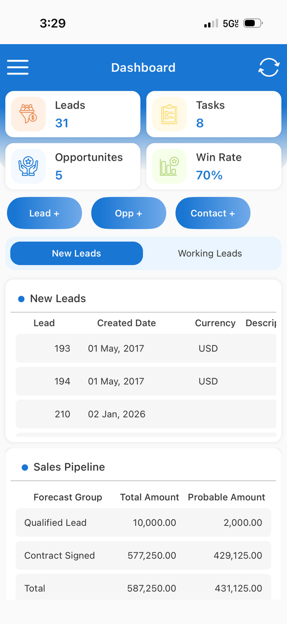
- Live Sales & CRM so reps can act on leads, opportunities, and customer orders in the field instead of after the fact.
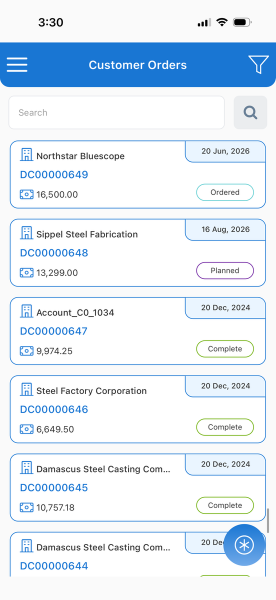
- Real-time inventory so anyone can confirm what stock exists and where, without a callback to the office.
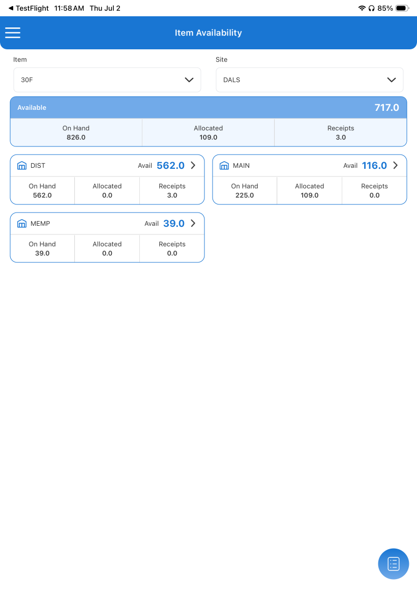
- Purchasing visibility so buyers can check order status and vendor detail the moment they need it.
This is the work that genuinely happens away from a desk, and it is deliberately a starting point rather than a finish line. More SyteLine roles are rolling out, and SyteRoam is designed to grow alongside them as your mobile companion to the system, not a replacement for it.
Where it shows up in a normal day
- On the production floor, a planner confirms a component's stock and location without walking back to a terminal.
- At a supplier's site, a buyer pulls up live order status and history and resolves a question in the conversation instead of a follow-up email.
- In a customer meeting, a rep checks real availability across sites and closes the order on the spot, no "let me get back to you."
- Between meetings, a manager reviews what is moving and catches a slipping order before it reaches the schedule.
Put SyteLine where the work happens
Your ERP already holds what your team needs to make good decisions. The only question is whether they can reach it in the moment those decisions get made. When live SyteLine data travels with your people, the workarounds fade, the follow-up calls shrink, and the business moves at the speed of the floor rather than the speed of the nearest desk.
If your team spends real time away from a workstation, see what real-time access changes. Book a demo and we will walk you through SyteRoam live against your own SyteLine data.
Frequently Asked Questions
Is SyteRoam a separate system from SyteLine?
No. SyteRoam connects live to your existing CloudSuite Industrial (SyteLine) environment, with no duplicate database. You are viewing and acting on the same data that lives in SyteLine, in real time, within your existing permissions.
What can my team do in SyteRoam today?
Live Sales & CRM, real-time inventory, and purchasing visibility, the workflows that happen away from a desk. Additional SyteLine roles are rolling out in future releases.
How is this different from other mobile ERP apps?
Many mobile apps show a cached or read-only copy of your data. SyteRoam surfaces your live SyteLine data directly, with the same permissions structure, so what you see on mobile is the real, current state of the system.
Do I need to set up new logins or permissions for mobile users?
No. SyteRoam inherits each user's existing SyteLine roles. Whatever a user can access on the desktop is what they access on mobile, with no reconfiguration required.